不失真批量自动生成标题缩略图代码
功能介绍:
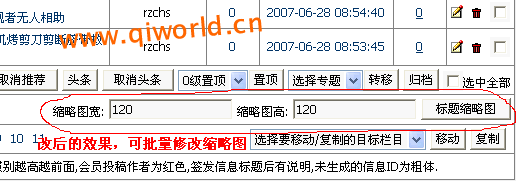
1、在增加信息时,不管是取第一张上传图作为标题图片,或选择上传图片作为标题图片,都暂可不管图片大小,可以大图上传。
2、然后在管理信息下端,输入标题图片缩略图宽度和高度,在操作列选择需要修改的相关信息,然后点击“标题缩略图”即可将选中的所有信息的标题缩略图修改成所需大小
3、生成的标题缩略图文件名为在原来的主文件名后加"small"
4、系统自动判断:对没有标题图片的信息和已经缩略过的信息不再执行操作。
5、不失真缩略,如:要求宽100,高100,那么缩略过程,会自动裁剪,保证不失真,拉伸。
效果图:
以下为修改方法:
一、首先,在t_functions.php中添加一下两个函数
function Titlepic_all ($id, $classid, $userid, $username, $pwidth, $pheight)
{
global $empire,$class_r,$class_zr,$dbtbpre,$keys;
$count = count ($id);
if (!$count)
{
printerror ('Noteditpic', 'history.go(-1)');
}
for ($i = 0; ($i < $count); ++$i)
{
$r = $empire->fetch1 ('select * from qiqu_ecms_'.$class_r[$classid][tbname].' where id='.$id[$i].' and titlepic<>""');
if(!empty($r[id])){
ImageResize("../../".$r[titlepic],$pwidth,$pheight,"");
if ($keys==1) {
$ss=substr($r[titlepic],0,-4)."s".substr($r[titlepic],-4);
$update = $empire->query ('update qiqu_ecms_'.$class_r[$classid][tbname].' set titlepic="'.$ss.'" where id='.$id[$i]);
}
}
}
printerror ('TitlepicAllSuccess', $_SERVER['HTTP_REFERER']);
}
Function ImageResize($srcFile,$toW,$toH,$toFile="")
{
global $keys;
if($toFile==""){ $toFile = substr($srcFile,0,-4)."small".substr($srcFile,-4); }
$info = "";
$data = GetImageSize($srcFile,$info);
switch ($data[2])
{
case 1:
if(!function_exists("imagecreatefromgif")){
echo "你的GD库不能使用GIF格式的图片,请使用Jpeg或PNG格式
!<a href='javascript:go(-1);'>返回</a>";
exit();
}
$im = ImageCreateFromGIF($srcFile);
break;
case 2:
if(!function_exists("imagecreatefromjpeg")){
Echo "你的GD库不能使用jpeg格式的图片,请使用其它格式的图
片!<a href='javascript:go(-1);'>返回</a>";
Exit();
}
$im = ImageCreateFromJpeg($srcFile);
break;
case 3:
$im = ImageCreateFromPNG($srcFile);
break;
}
$srcW = ImageSX($im);
$srcH = ImageSY($im);
$keys= 0;
if (($srcW>$toW) or ($srH>$toH)){
if(($srcW/$toW)>=($srcH/$toH)){
$temp_height=$toH;
$temp_width=$srcW/($srcH/$toH);
$src_X=Abs(($toW-$temp_width)/2);
$src_Y=0;
}
else{
$temp_width=$toW;
$temp_height=$srcH/($srcW/$toW);
$src_X=0;
$src_Y=Abs(($toH-$temp_height)/2);
}
$temp_img=ImageCreateTrueColor($temp_width,$temp_height);
imagecopyResampled($temp_img,$im,0,0,0,0,$temp_width,$temp_height,$srcW,$srcH);
$ni=ImageCreateTrueColor($toW,$toH);
imagecopyResampled($ni,$temp_img,0,0,$src_X,$src_Y,$toW,$toH,$toW,$toH);
if(Function_exists('imagejpeg')) ImageJpeg($ni,$toFile);
else ImagePNG($ni,$toFile);
ImageDestroy($ni);
$keys= 1;
}
ImageDestroy($im);
}
上面两个函数为缩略图生成函数,请搜索"qiqu_"(为表的前缀)修改成你自己的前缀。
二、修改 e/admin/listnews.php,大约在42行左右“选中全部 </div></td></tr>”的后面添加以下代码:
<tr bgcolor="#FFFFFF">
<td height="25" colspan="7"><div align="right">
缩略图宽: <input name="pwidth" type="text" value="120" width="60">
缩略图高: <input name="pheight" type="text" value="120" width="60">
<input type="submit" name="Submit355" value="标题缩略图" onClick="document.listform.enews.value='Titlepic_all';">
</div></td></tr>
其中,图宽和图稿的默认值可按自己的情况设定,设定好后,以后操作更方便。
三、在e/admin/enews.php中添加如下代码:
//批量加标题图片
elseif($enews=="Titlepic_all")
{
$id=$_POST['id'];
$classid=$_POST['classid'];
$bclassid=$_POST['bclassid'];
$pwidth=$_POST['pwidth'];
$pheight=$_POST['pheight'];
Titlepic_all($id,$classid,$logininid,$loginin,$pwidth,$pheight);
}
四、函数中用到“ printerror ('Noteditpic', 'history.go(-1)');”等操作提示,这个提示可加在e/data/language/gb/pub/message.php;当然这一步不加也不影响操作
五、本人已调试成功,并正在用,确实非常方便,所有缩略图只需鼠标点一点,便可批量改变,且不变形、不失真(可看看我的网站:www.qiworld.cn)。
有哪位朋友按此方法试验成功的请跟贴说明,
特别注意:在修改之前一定先备份相关文件,由此造成的损失本人概不负责。
|
[该贴被修改 3 次,最后修改时间 2007-07-26 18:14:48 ]
|



 顶部
顶部  加入收藏夹
加入收藏夹


 2007-07-26 15:30:43
  已设置保密
已设置保密
 回复
回复 引用
引用 报告
报告 编辑
编辑 删除
删除