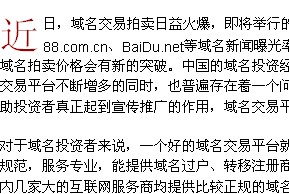
CSS:
.content_12pt{
font-size:14px;
color:#000000;
line-height: 20px;
padding-top: 0px;
padding-right: 0px;
padding-bottom: 0px;
padding-left: 0px;
text-align: justify;
margin-top: 0;
margin-bottom:0;
vertical-align:top;
}
.ContentHighlight{
display:block;
float: left;
font-size:39px;
color: #990000;
width: 40px;
height: 36px;
line-height:36px;
+line-height:40px !important;
_line-height:40px;
padding:0;
margin:0;
}
使用代码:<p class='ContentHighlight'>第一个文字</p><span class='content_12pt'> 正文 </span>
用css也能实现:
语法:
Selector : first-letter { sRules }
说明:
设置对象内的第一个字符的样式表属性。
此伪对象仅作用于块对象。内联对象要使用该伪对象,必须先设定对象的height或width属性,或者设定position属性为absolute,或者设定display属性为block。
在此伪类中配合使用font-size属性和float属性可以制作首字下沉效果。
示例:
p a:first-letter { color: green }
div:first-letter { color:red;font-size:16px;float:left; }
|



 顶部
顶部  加入收藏夹
加入收藏夹


 2007-09-09 18:40:30
  已设置保密
已设置保密
 回复
回复 引用
引用 报告
报告 编辑
编辑 删除
删除