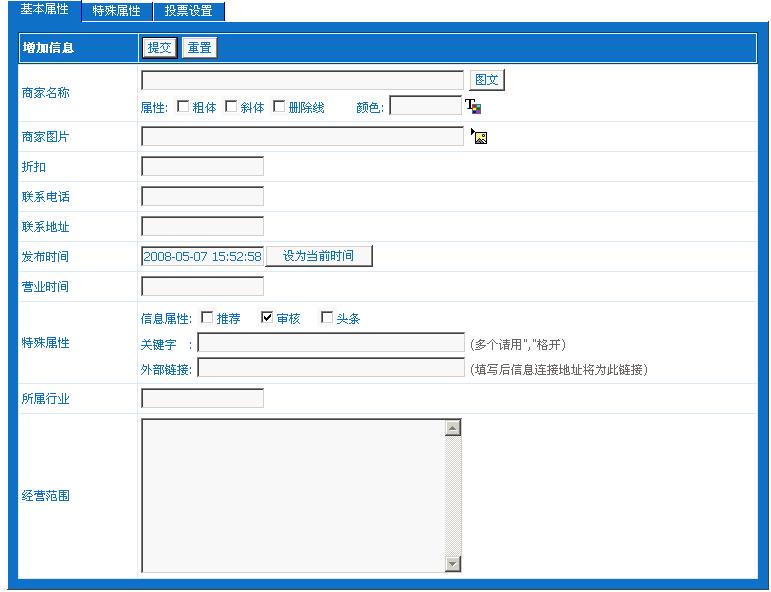
刚刚完成的,才开始入手,运用到数据表自己做了这个功能。高手请勿踩!!
演示地址:http://www.fqdzw.com/gouwu/
页面模板内容:
[!--temp.header--]
<table width="1000" border="0" align="center" cellpadding="0" cellspacing="1">
<tr>
<td><table width="100%" border="0" align="center" cellpadding="0" cellspacing="5">
<tr>
<td height="30" bordercolor="#F7F7F7"><img src="/skin/default/images/ad02.gif" width="989" height="100"></td>
</tr>
</table></td>
</tr>
</table>
<table width="1000" border="0" align="center" cellpadding="0" cellspacing="1">
<tr>
<td><table width="100%" border="0" cellpadding="0" cellspacing="1">
<tr>
<td width="63%" height="30" valign="top"> <table width="100%" border="0" cellpadding="0" cellspacing="5">
<tr>
<td><table width="100%" border="0" cellpadding="0" cellspacing="1" bgcolor="#FFFFFF">
<tr>
<td bgcolor="#FFFFFF"><table width="100%" border="0" cellpadding="0" cellspacing="5">
<tr>
<td height="30" class="classlinkclass">现在的位置:[!--newsnav--] </td>
</tr>
</table></td>
</tr>
<tr>
<td bgcolor="#FFFFFF"><table width="980" border="0" cellpadding="0" cellspacing="1" bgcolor="#990000">
<tr>
<td height="30" bgcolor="#990000"> </td>
</tr>
<tr>
<td bgcolor="#FFFFFF"><table width="100%" border="0" cellpadding="0" cellspacing="5">
<tr>
<td>[!--empirenews.listtemp--]
<!--list.var1-->
[!--empirenews.listtemp--]</td>
</tr>
</table> </td>
</tr>
</table></td>
</tr>
<tr>
<td bgcolor="#FFFFFF"><table width="100%" border="0" cellpadding="0" cellspacing="5">
<tr>
<td height="30">[!--show.page--]</td>
</tr>
</table></td>
</tr>
</table></td>
</tr>
</table></td>
</tr>
</table></td>
</tr>
</table>
[!--temp.footer--]
列表内容模板
<script language="JavaScript">
var searchResult=new Array();//鼠标滑过时显示背景色
function borderize(what,color,color2)
{
what.style.borderColor=color
what.style.backgroundColor=color2
}
function borderize_on(e){
if (document.all)
source3=event.srcElement
else if (document.getElementById)
source3=e.target
if (source3.className=="zuo22"){
borderize(source3,"#999999","#F6F6F8")
}
else{
while(source3.tagName!="TABLE"){
source3=document.getElementById? source3.parentNode : source3.parentElement
if (source3.className=="zuo22")
borderize(source3,"#999999","#F6F6F8")
}
}
}
function borderize_off(e){
if (document.all)
source4=event.srcElement
else if (document.getElementById)
source4=e.target
if (source4.className=="zuo22")
borderize(source4,"white","white")
else{
while(source4.tagName!="TABLE"){
source4=document.getElementById? source4.parentNode : source4.parentElement
if (source4.className=="zuo22")
borderize(source4,"white","white")
}
}
}
</script><style type="text/css">
<!--
.style4 {font-size: 12px}
.style5 {color: #FF0000; font-size: 12px; }
.style8 {font-size: 14px; color: #006633; }
.style9 {color: #FF0000}
.style11 {font-size: 14px}
-->
</style>
<table width="100%" border="0" onMouseOver="borderize_on(event)" onMouseOut="borderize_off(event)" class="zuo22" onclick="javascript:clickfun('123')">
<TR>
<TD width="11%" rowspan="3"><a href="[!--titleurl--]" target="_blank"><img src="[!--titlepic--]" width="100" height="80" border="0" class="images"></a></TD>
<TD height="25"> <span class="style11">商家名称:</span><a href="[!--titleurl--]" target="_blank" class="sybiaoti">[!--title--]</a> </TD>
<TD width="24%" height="25">所属行业:<span class="style4">[[!--hangye--]]</span></TD>
<TD width="19%">营业时间:[!--yytime--]</TD>
<TD height="25" class="style5">折扣:[!--dazhe--]</TD>
</TR>
<TR>
<TD height="30" colspan="4"><span class="style8">经营范围:[!--jyfw--]</span></TD>
</TR>
<TR>
<TD width="32%" height="20"><span class="style4"><font color="#333333"> 商家电话:</font><span class="style9">[!--tel--]</span><span class="style4"><font color="#333333"> </font></span></span></TD>
<TD colspan="2"><span class="style4"><font color="#333333">商家地址:</font></span><span class="style5"><span class="style4"><font color="#333333">[!--dizhi--]<font color="#333333"> </font></font></span></span></TD>
<TD width="14%"><span class="style5"><span class="style4"><font color="#333333"><font color="#333333">信息发布时间</font></font></span></span><span class="style4"><font color="#333333"><font color="#333333">:</font></font></span><span class="style5"><span class="style4"><font color="#333333"><font color="#333333">[!--newstime--]</font></font></span></span></TD>
</TR>
</table>
下载附件后,进入后台》》系统设置》管理数据表》导入系统模型》将下载的附件导入。然后新建一个列表模板,将上面的代码复制进去。新建栏目,OK。[img][/img]
上传以下附件:
[下载 *.mod](文件大小:26.13 KB,下载次数:35)
|



 顶部
顶部  加入收藏夹
加入收藏夹


 2008-05-07 15:49:26
  已设置保密
已设置保密
 回复
回复 引用
引用 报告
报告 编辑
编辑 删除
删除